Computer Tips and Tricks
Get the latest posts via rss
Showing posts with label 2007. Show all posts

Monday, 12 September 2011

Save Sent Items in folder of a shared mailbox in Outlook 2007

We have a lot of users that access multiple mailboxes from within their own exchange account in Outlook. Attached as "additional mailboxes".

Mail can be sent and received from these mailboxes as long as the user has send of behalf of permissions. This is set in Exchange.

However, when a user sends an email on behalf of the additional mailbox, the sent email goes into the sent items of the person who has the additional mailbox attached (their own mailbox). And NOT the sent items of the additional mailbox.

Wednesday, 3 February 2010

Install SCOM 2007 R2 Agent to vSphere 4 (ESX) Servers

SCOM 2007 R2 includes agents for UNIX/LINUX servers, and we therefore decided to push these out to our ESX Hosts, running vSphere 4. All looked easy enough at first, go into administration, run a discovery, select “Unix/Linux computers”, enter host name/IP/IP Range and off you go.

This is a Microsoft product communicating with a Linux OS, so as expected its not as easy as that. All discovers OK and the install starts on the Hosts, the agent gets partially installed but then fails with a “Not Enough Entropy” error.

Monday, 4 January 2010

Microsoft Project Server 2007 on Server 2008 R2

We recently had a request for a clean install of Microsoft Project Server 2007. As we are currently, where possible, installing only Server 2008 R2 boxes, it was agreed to install Project on an R2 Box.

Having looked at the pre-requisites as follows, this looked to be a simple install.

 Windows SharePoint Services 3.0 or Office SharePoint Server with recent updates

Windows Server 2008 requires an updated version of Office SharePoint Server 2007 and Windows SharePoint Services 3.0.

Application Server role

Running ISINTEG on Microsoft Exchange 2007

When you have the unfortunate issue of a corrupt data store in Exchange 2007, and the event logs are showing, for example, event ID 1160 for source MSExchangeIS you have to rely first on good old ISINTEG.
Now, nothing new here, ISINTEG has been around for many years and versions of Exchange, but when I recently had to run it I found that the listed format for running this did not work in Exchange 2007 i.e. ISINTEG –FIX
ISINTEG is in the same place as all other versions of Exchange the \BIN folder. If you have a standard install this will be located in C:\Program Files\Microsoft\Exchange Server\Bin .
To get this to run and fix the errors we were experiencing I did as follows;

Monday, 21 December 2009

Enable Windows 7 Administrator Account GPO

By default, as was with Vista, the local Administrator account in windows 7 is disabled. If you are deploying Windows 7 across a number of clients on a network etc. you may find the need to enable this account for future trouble shooting client machines. Also remember, even if you enable the Administrator account, and then run Sysprep, the sysprep process disables the Administrator account.
By far the easiest way to enable the Administrator account on client machines in a domain is to use Group Policy, here is how you achieve this.
I am assuming you have the basic understandings of applying/creating Group policy settings on a Windows Domain, if not, leave a comment and i will see how i can help further.
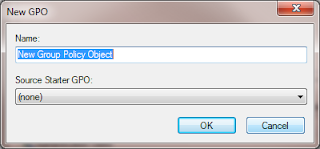
Go ahead and open “Group Policy Management”, for testing purposes, it may be worth creating a new policy on a test OU, and placing some test client accounts within that OU. So Right click your OU and select “Create a GPO in this domain, and Link it here”. The new GPO pox will prompt you for a Name, so go ahead and give it a meaningful Name, and click OK.

Tuesday, 15 December 2009

Using Word 2007 as your Blog Editor.


I was looking around to see if I could find a Blog editor to use locally on my clients rather than creating and editing directly within the online blogger tools. To my surprise, I found that you can publish directly from Microsoft Word 2007 to you blog on Blogger, so I thought I would give it a go.

It looked easy and straight forward enough, just click on publish and select Blog