
A friend of mine has been having issues for sometime when opening new tabs in Internet Explorer 8 in Windows Vista. Some would open fine and load the sites. Others would hang or timeout. Once one tab had failed, the rest would too until IE8 was closed and reopened. After numerous registry edits and disabling of plug-ins and ActiveX controls we finally found a solution.
On occasions when installing IE8, "actxprxy.dll" fails to register and can cause slow or non-responsive tabs. Actxprxy.dll is a module that contains functions used for Marshaling of ActiveX COM interfaces in IE.
Wednesday, 27 January 2010

Monday, 4 January 2010
Microsoft Project Server 2007 on Server 2008 R2
We recently had a request for a clean install of Microsoft Project Server 2007. As we are currently, where possible, installing only Server 2008 R2 boxes, it was agreed to install Project on an R2 Box.
Having looked at the pre-requisites as follows, this looked to be a simple install.
Windows SharePoint Services 3.0 or Office SharePoint Server with recent updates
Windows Server 2008 requires an updated version of Office SharePoint Server 2007 and Windows SharePoint Services 3.0.
Application Server role
Running ISINTEG on Microsoft Exchange 2007
When you have the unfortunate issue of a corrupt data store in Exchange 2007, and the event logs are showing, for example, event ID 1160 for source MSExchangeIS you have to rely first on good old ISINTEG.
Now, nothing new here, ISINTEG has been around for many years and versions of Exchange, but when I recently had to run it I found that the listed format for running this did not work in Exchange 2007 i.e. ISINTEG –FIX
ISINTEG is in the same place as all other versions of Exchange the \BIN folder. If you have a standard install this will be located in C:\Program Files\Microsoft\Exchange Server\Bin .
To get this to run and fix the errors we were experiencing I did as follows;
Tuesday, 22 December 2009
Killing a hanging Windows Service
Services have the tendency to hang during a "Starting" or "Stopping" state causing a program to fail. Usually a reboot can correct the problem, but this is not always appropriate. There is an alternative in the form of an "sc query" and a "taskkill" commands.
The "sc query" is used to identify the PID or process identifier of a running service. This is required to perform the "taskkill" command.
To obtain the PID, first find out the exact name of the service you wish to kill. It can be found in the service properties.

The "sc query" is used to identify the PID or process identifier of a running service. This is required to perform the "taskkill" command.
To obtain the PID, first find out the exact name of the service you wish to kill. It can be found in the service properties.

Windows Server 2003 Service Timeout
Frequently on Windows Server 2003 when rebooting, a service may fail to start and the following message appears over the logon screen:


Or when trying to start or restart a service manually you may receive this message.

This is because the timeout delay is set to low for the service to complete its startup process and causes it to fail.
Monday, 21 December 2009
Enable Password URLs in Internet Explorer 8 (Windows 7, 64 Bit)
Have you ever received a link like the one below for a website where the user name and password is incorporated in to the URL?
Example: http://username:password@websiteaddress.com/
When clicked these URLs take you to a website and automatically log you in to it.
In older versions of Internet Explorer it used to just work, however in the IE7 and above Microsoft have disabled the feature for security reasons.
However this can be re-enabled if required by a simple registry fix.
Example: http://username:password@websiteaddress.com/
When clicked these URLs take you to a website and automatically log you in to it.
In older versions of Internet Explorer it used to just work, however in the IE7 and above Microsoft have disabled the feature for security reasons.
However this can be re-enabled if required by a simple registry fix.
Enable Windows 7 Administrator Account GPO
By default, as was with Vista, the local Administrator account in windows 7 is disabled. If you are deploying Windows 7 across a number of clients on a network etc. you may find the need to enable this account for future trouble shooting client machines. Also remember, even if you enable the Administrator account, and then run Sysprep, the sysprep process disables the Administrator account.
By far the easiest way to enable the Administrator account on client machines in a domain is to use Group Policy, here is how you achieve this.
I am assuming you have the basic understandings of applying/creating Group policy settings on a Windows Domain, if not, leave a comment and i will see how i can help further.
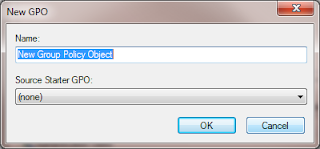 Go ahead and open “Group Policy Management”, for testing purposes, it may be worth creating a new policy on a test OU, and placing some test client accounts within that OU. So Right click your OU and select “Create a GPO in this domain, and Link it here”. The new GPO pox will prompt you for a Name, so go ahead and give it a meaningful Name, and click OK.
By far the easiest way to enable the Administrator account on client machines in a domain is to use Group Policy, here is how you achieve this.
I am assuming you have the basic understandings of applying/creating Group policy settings on a Windows Domain, if not, leave a comment and i will see how i can help further.
 Go ahead and open “Group Policy Management”, for testing purposes, it may be worth creating a new policy on a test OU, and placing some test client accounts within that OU. So Right click your OU and select “Create a GPO in this domain, and Link it here”. The new GPO pox will prompt you for a Name, so go ahead and give it a meaningful Name, and click OK.
Thursday, 17 December 2009
Creating a Windows 7 Sysprep unattended XML
Having successfully sysprepped Windows 7, i thought i would break down the processes required into some smaller blogs, so here goes for creating the required unattended XML file.
To create the unattended XML you will need the latest version of WAIK (Windows Automated Installation Kit) and you can download that from the Microsoft Download centre here.
Once you have downloaded and installed WAIK, go ahead and launch Windows System Image manager, and you will be presented with the following

To create the unattended XML you will need the latest version of WAIK (Windows Automated Installation Kit) and you can download that from the Microsoft Download centre here.
Once you have downloaded and installed WAIK, go ahead and launch Windows System Image manager, and you will be presented with the following

Wednesday, 16 December 2009
Configuring Windows Server 2008 R2 DHCP Split-Scope
At last with Windows Server 2008 R2 Microsoft have introduced an easy way to provide some form of redundancy for DHCP servers with the new Split-Scope Wizard. Administrators have always had to provide some form of DHCP redundancy in larger networks, this was usually done by manually splitting scopes across more than one server, and if a lot of scopes are required this can be a laborious job, and not the easiest to manage.
So what have Microsoft introduced now? Lets presume that you have 2 DHCP servers configured on your network. On server 1 you go ahead and configure your DHCP scope as you always have, include any Scope Options, server options etc. When you define your scope, include all the range that you will be wanting to split, for example a new scope;
IP Range 10.1.1.100 – 10.1.1.200
So, nothing new so far, once you scope is configured, right click on the new scope, select advanced, and then Split-Scope,
So what have Microsoft introduced now? Lets presume that you have 2 DHCP servers configured on your network. On server 1 you go ahead and configure your DHCP scope as you always have, include any Scope Options, server options etc. When you define your scope, include all the range that you will be wanting to split, for example a new scope;
IP Range 10.1.1.100 – 10.1.1.200
So, nothing new so far, once you scope is configured, right click on the new scope, select advanced, and then Split-Scope,
Using Windows Live Writer with Blogger
Following on from my recent posts about publishing blogs to Blogger with Word 2007 and word 2010 and the associated issues with uploading images i have given Windows Live Writer a try.
As i am sure you are aware this is a free utility available with the Windows Live family. Once downloaded and installed its easily enough to configure to use with Blogger. When you first open it, it asks for connection information to your existing blog site like so

As i am sure you are aware this is a free utility available with the Windows Live family. Once downloaded and installed its easily enough to configure to use with Blogger. When you first open it, it asks for connection information to your existing blog site like so

Subscribe to:
Posts (Atom)


 Posts
Posts


